Limi's tests for its new account switch run against a fake Claude Code and a fake Keychain. A real switch moves every Claude Code session on the Mac, including the ones I had open, so I did the first real one by hand: I switched claude to a second Claude account and back. Both worked, and the way back didn't open a browser.
Limi is a free, open-source menu bar app for macOS. It shows the 5-hour and weekly limits of several Claude Code and Codex accounts, and since 1.1.0 it also switches the account Claude Code uses in one click, without signing in again. Your account details stay on your Mac.

claude to that account.Limits for every account
You add Claude Code and Codex accounts in Settings, and Limi puts each one's 5-hour and weekly limits in the menu bar. Click a group for the details, including when each limit resets. Claude's per-model weekly limits show up too when the service reports them.

You can group accounts, pick a style (Multi Bar, Ring Gauge, Capsule Fill or Text Only) and choose which limits each group shows. A limit past 90% turns red. There's experimental support for Antigravity too.
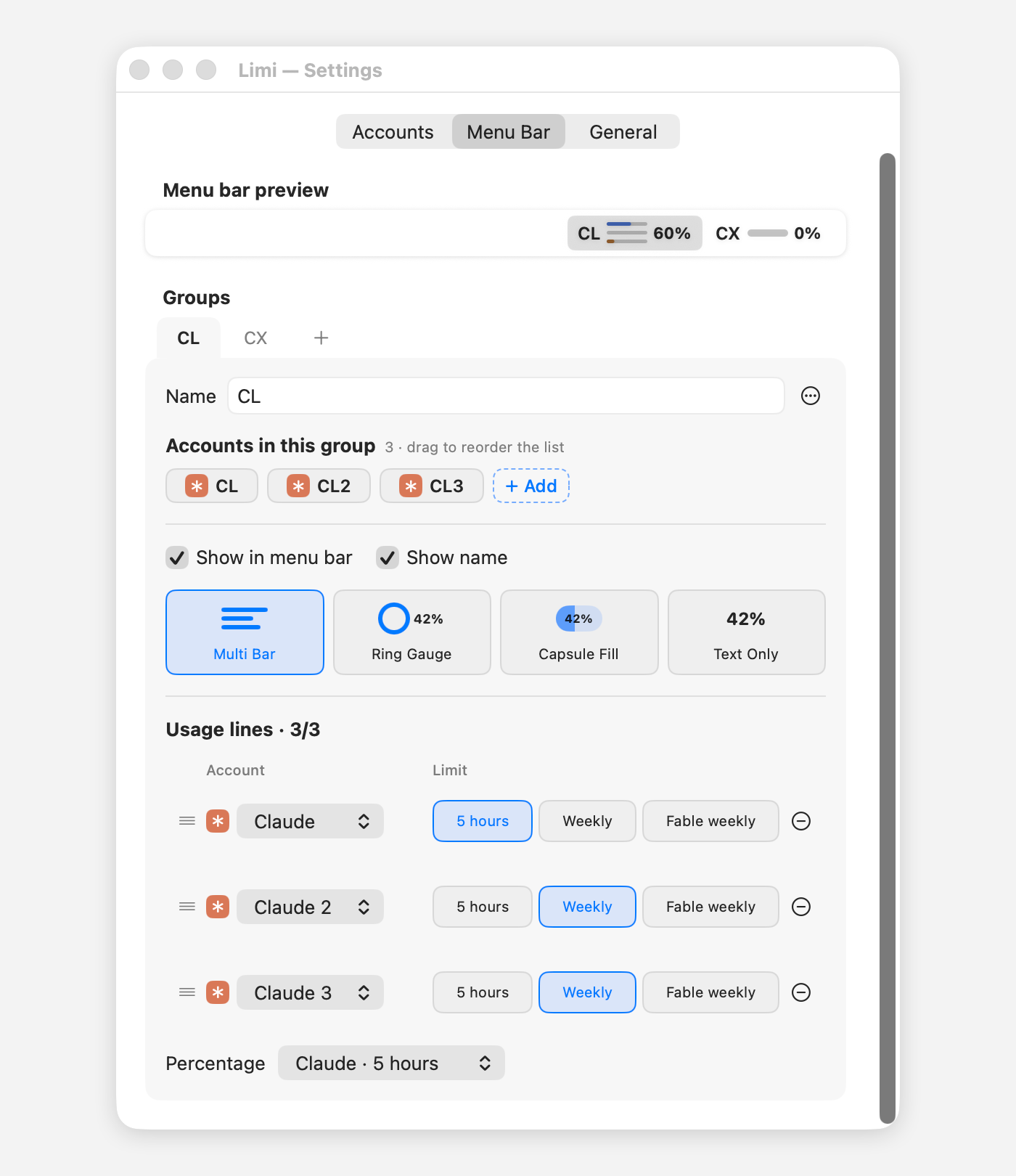
A value Limi couldn't read shows as --, never a made-up 0%, and older values are marked as cached.
Limi has no server and no account of its own. Sign-ins stay in a private folder on your Mac, and Limi asks each service directly: Anthropic's OAuth usage API for Claude, where Limi names itself Limi/<version> in each request, and the official codex app-server for Codex. There are no analytics, and Limi connects to kalti.co.kr only to check for updates.
Switching the account Claude Code uses
Claude Code has one default login, and plain claude and every session started from it use that login. Its docs suggest giving each account its own configuration directory if you want to stay signed in to several at once, such as a work account and a personal one. That works per terminal. Changing the default login itself meant claude auth login and the browser again.
With Limi you set each Claude account up once: "Set Up…" in Settings › Accounts has Claude Code sign it in through your browser, into a folder of its own. That login is separate from the one Limi reads usage with, so switching never stops the usage display. After that, "Use" in the account's panel moves Claude Code to it. Open sessions follow within about 30 seconds, Remote Control disconnects, and the account shows "In use".
Limi never writes Claude Code's login itself. It runs claude auth login with the account's refresh token in CLAUDE_CODE_OAUTH_REFRESH_TOKEN, an environment variable Claude Code documents: when it's set, claude auth login exchanges the token directly instead of opening a browser. Claude Code added that in 2.1.309, so switching needs that version or later.
The catch is that a refresh token works once. Handing a login to Claude Code uses it up, so Limi never hands the same one over twice. The login Claude Code had before goes back to its own account in Limi, which is why switching back needs no browser either. If an open session renews that login in the middle of a switch, that account has to be set up once more.
After a switch, Limi reads Claude Code's login again and tells you if it isn't the account you chose. If Claude Code is signed in to an account Limi doesn't have, Limi asks first, because switching removes that login. Quitting, or restarting for an update, waits up to 90 seconds for a running switch, since the login then exists only in Limi's memory; if Limi still stops halfway, it finishes or undoes the switch on its next launch. Each switch is logged, without tokens.
It switches only when you press the button, never on its own, and only between accounts you signed in to yourself. The switching engine comes from AgentBar, the app Limi is based on. For Limi I built the button, the setup step in Settings and the screens around them.
Things macOS (and Sparkle) taught me
Claude Code's Keychain item trusts one tool
Limi reads Claude usage with each account's own copy of its login, taken from the Keychain right after you sign in. Claude Code saves its login there through /usr/bin/security, so the Keychain item trusts only that tool. An early build read the item itself, and macOS asked for the login keychain password every time an account reconnected. With the ad-hoc signature that build had, macOS couldn't remember the answer either.
Now Limi reads the item the way the CLI does, through /usr/bin/security, once, and keeps the copy in that account's folder. The timed refresh reads only that file. security has no option to keep its windows from appearing, so Limi never runs it on a timer. The "In use" label is read when you open a panel or Settings, or press refresh, and from the Keychain it reads only whether the item exists, never the token. Nothing can bring up a Keychain window while you're away.
A locked Mac signed accounts out
Limi keeps each account's Claude login in a file, and those files used to have "complete unless open" protection, so the refresh couldn't open them while the Mac was locked. Each failed read fell back to Claude Code's Keychain item, and where the Keychain allowed that read, the fallback wrote the copy saved at sign-in over the file. That copy held a refresh token the first renewal had already spent. The next renewal got HTTP 400, and the account said it needed a new sign-in.
The fix came from AgentBar: the refresh now reads only the account's own file and tries again next time if it can't, and the files are written with "until first user authentication" protection, which can still be read while the Mac is locked. Files saved before the change keep their old protection until a token renewal rewrites them: during one lock, the Codex numbers kept updating and the Claude ones stayed at the last refresh before the lock. The timed refresh doesn't fall back to the Keychain anymore, because a successful read there was what signed the accounts out.
An update shouldn't take your focus
Limi lives in the menu bar and never takes focus from the app you're using, and I didn't want its updates to either. It updates itself with Sparkle, which checks about once a day. Sparkle 2.2 and later can show an update it found on its own behind the other apps instead of bringing the app to the front, if the app declares support for gentle reminders. Limi does. Nothing installs until you click "Install Update". When I tested the update to 1.1.1 on my Mac, from both 1.0.0 and 1.1.0, that click and then "Install and Relaunch" brought Limi back as 1.1.1.
The 1.1.1 release itself is small: the panel's buttons now react when the pointer is over them, because before that it wasn't obvious they were buttons. I left out the pointing-hand cursor. It felt like a web page.
If you want to try it
Limi is free and open source under the MIT License. It's signed with a Developer ID and notarized by Apple, and every update has to be signed with Limi's own update key. It runs on Macs with Apple silicon and macOS 14 or later. Each service needs its official command-line tool, claude or codex (ideally installed with Homebrew), and a subscription sign-in; usage on API keys isn't shown.
Download it from https://kalti.co.kr/limi/ or from the latest release on GitHub: https://github.com/kalti-lab/limi/releases/latest. The code is at https://github.com/jsiksn/limi. Limi is based on AgentBar by chenjingdev.
If something breaks, open an issue on GitHub or write to support@kalti.co.kr.
Limi is an unofficial app. It is not affiliated with, endorsed by or sponsored by Anthropic, OpenAI or Google. It reads usage in ways these companies can change or block at any time, and Limi may stop working when they do. Claude, Claude Code, ChatGPT, Codex, Antigravity and other product names are trademarks of their respective owners.